Real-Time Event Tracking in React Native with PostHog
 By Dilna K Vasavan
| September 25, 2026
By Dilna K Vasavan
| September 25, 2026
Understanding how users actually interact with your app is critical and PostHog gives you a self-hostable, privacy-friendly way to do it without relying on black-box analytics platforms. Here’s how to implement clean, performant event tracking in a React Native app.
Why PostHog?
- Open-source & self-hostable – full control over your data
- Product analytics + feature flags + session replay in one SDK
- No vendor lock-in – export your data anytime
- Greater data control – self-hosting gives us more control over data storage and processing, but compliance with GDPR/CCPA still depends on our overall data practices.
Step 1: Install the SDK

Store your API key and host in environment-specific config files, so development, staging, and production each report to isolated PostHog projects.
Step 2: Lazy-Initialize the Client
Instantiating the PostHog client at module load time starts timers, storage, and network queues before your app renders, which can add to startup work. To defer that, initialize it lazily, on first use:

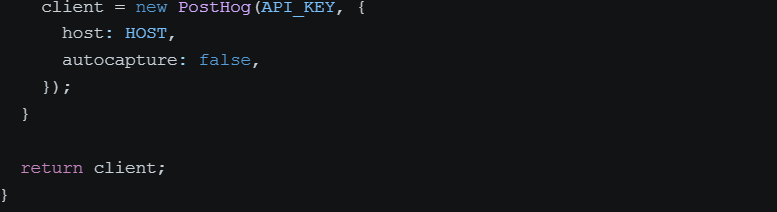
The trade-off is that events fired before the first call, like app open or the first screen view, can be missed.
Step 3: Whitelist Your Events
Rather than relying on autocapture (which fires on every tap and generates noisy, hard-to-query data), define an explicit list of meaningful events, e.g. screen_viewed, item_purchased, signup_completed in one central constant file.
This keeps your analytics dashboard clean and makes it trivial for the whole team to know what’s tracked.
Step 4: Capture Events with Context
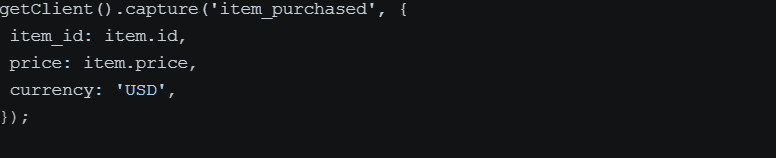
Always attach relevant properties, they’re what make funnels, cohorts, and retention charts useful later.
Step 5: Identify Users
Right after login or signup, merge the anonymous session with the known user identity:

When the user logs out, call reset() to clear the current PostHog user identity:

This lets you trace a user’s full journey, from their very first anonymous open to becoming a paying customer.
Step 6: Guard Against Duplicate Events
Fast re-renders or double-taps can fire the same event twice. A simple time-boxed dedup check (e.g., ignore identical event + properties within 500ms) keeps your data trustworthy without extra infrastructure.
PostHog Features
1. Product Analytics
Track meaningful user actions and understand how users interact with different features of your application.
2. Funnels
Create funnels to identify where users drop off in important flows.
For example:
App Opened
↓
Started Signup
↓
Completed Signup
↓
Created Item
↓
Completed Purchase
3. Session Replay
Session replay allows you to understand why users got stuck, rather than only knowing where they dropped off.
4. Feature Flags
Feature flags allow you to control feature availability and roll out features selectively.
5. Cohorts
Create groups of users based on their actions or properties and analyze their behavior separately.
6. Retention
Analyze whether users continue returning to your application after completing important actions.
What You Get
- Real-time dashboards showing exactly how users move through your app
- Funnels to spot drop-off points
- Session replay to see why users got stuck, not just where
- A single, queryable source of truth for product decisions
Limitations to Plan For
- Cloud free tier has usage and retention limits; self-hosted deployments are primarily limited by your own infrastructure and storage capacity.
- Dev builds are often disabled by design, don’t expect local test data in your dashboards
- Autocapture is easy to enable but produces low-signal data; explicit event tracking requires more upfront design but pays off in insight quality
Author
Related articles
Contact us

Leave us basic information about a project and we will get back to you with answer
Need instant answers?
Our AI assistant is available 24/7 to answer questions on pricing, timelines, and project scope.
Click Here